TV Size
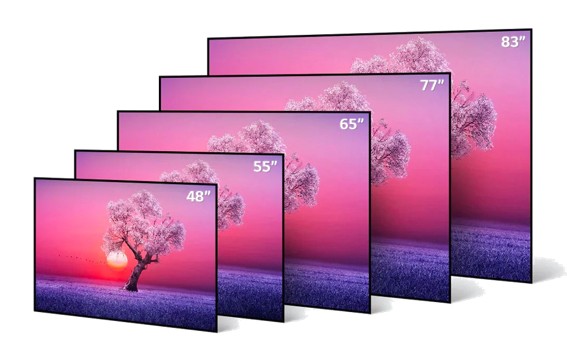
| TV Size | Width | Height | Area | ||||||
|---|---|---|---|---|---|---|---|---|---|
| inches | inches | cm | inches | cm | in² | m² | |||
| 32 | 27.9 | 70.9 | 15.7 | 39.9 | 438 | 0.283 | |||
| 40 | 34.9 | 88.6 | 19.6 | 49.8 | 684 | 0.441 | |||
| 43 | 37.5 | 95.3 | 21.1 | 53.6 | 791 | 0.511 | |||
| 50 | 43.6 | 110.7 | 24.5 | 62.2 | 1068 | 0.689 | |||
| 55 | 47.9 | 121.7 | 27 | 68.6 | 1293 | 0.835 | |||
| 60 | 52.3 | 132.8 | 29.4 | 74.7 | 1538 | 0.992 | |||
| 65 | 56.7 | 144 | 31.9 | 81 | 1809 | 1.166 | |||
| 70 | 61 | 154.9 | 34.3 | 87.1 | 2092 | 1.349 | |||
| 75 | 65.4 | 166.1 | 36.8 | 93.5 | 2407 | 1.553 | |||
| 80 | 69.7 | 177 | 39.2 | 99.6 | 2732 | 1.763 | |||
| 85 | 74.1 | 188.2 | 41.7 | 105.9 | 3090 | 1.993 | |||
| 98 | 85.4 | 216.9 | 48 | 121.9 | 4099 | 2.644 | |||
| 100 | 87.2 | 221.5 | 49 | 124.5 | 4273 | 2.758 | |||
| 110 | 95.9 | 243.6 | 53.9 | 136.9 | 5169 | 3.335 | |||
| 115 | 100.2 | 254.5 | 56.4 | 143.3 | 5651 | 3.647 | |||
| TV Size Chart Maker : SSize.com | |||||||||
| TV Size | Minimum distance for 4K TV | Minimum distance for 1080p TV | |||||||
|---|---|---|---|---|---|---|---|---|---|
| 40 inches | 40 inches (3.3 feet) | 80 inches (6.7 feet) | |||||||
| 42 inches | 42 inches (3.5 feet) | 84 inches (7 feet) | |||||||
| 48 inches | 48 inches (4 feet) | 96 inches (8 feet) | |||||||
| 50 inches | 50 inches (4.2 feet) | 100 inches (8.3 feet) | |||||||
| 55 inches | 55 inches (4.6 feet) | 110 inches (9.2 feet) | |||||||
| 60 inches | 60 inches (5 feet) | 120 inches (10 feet) | |||||||
| 65 inches | 65 inches (5.4 feet) | 130 inches (10.8 feet) | |||||||
| 75 inches | 75 inches (6.25 feet) | 150 inches (12.5 feet) | |||||||
| 85 inches | 85 inches (7.1 feet) | 170 inches (14.2 feet) | |||||||
| TV Size Guide Maker : SSize.com | |||||||||
TV Size And Size Guide
How to choose TV size?
Choosing a television is one of the most impactful decisions for your home entertainment setup. Yet, the question of "What size TV should I get?" often leads to confusion, outdated advice, and sometimes, regret. The classic rule of thumb—a simple distance-to-size ratio—is a relic of the standard-definition era. In the age of 4K, 8K, and immersive home theater experiences, selecting the right screen size is a nuanced decision that blends science, environment, and personal preference.
This comprehensive guide will move beyond basic charts to provide you with a holistic framework for choosing your ideal TV size. We will debunk myths, explore the critical factors, and equip you with the knowledge to make a confident investment in your viewing experience.
Part 1: Why the Old Rules No Longer Apply?
For decades, the dominant guideline was based on avoiding the "screen-door effect"—seeing the individual pixels that make up the image. This led to conservative recommendations, such as choosing a screen size (in inches) that is approximately equal to your viewing distance (in feet) multiplied by 7 to 10. For a 10-foot distance, this old rule suggested a 70- to 100-inch screen, which seemed impractically large to most consumers.
The advent of High Dynamic Range (HDR) and ultra-high resolutions like 4K (3840 x 2160 pixels) and 8K (7680 x 4320 pixels) has fundamentally changed the game. With pixel density so high that individual pixels are invisible even at close range, the new priority is not avoiding pixelation, but maximizing immersion and capturing your field of view.
The Society of Motion Picture and Television Engineers (SMPTE) recommends that the screen fill a 30-degree field of view for a cinematic feel. For a truly immersive experience, THX recommends a 40-degree field of view. These recommendations directly support larger screens at standard living room distances.
Part 2: The Core Framework: A Multi-Factor Approach.
Your ideal TV size is the intersection of four key dimensions: Viewing Distance, Content Resolution, Room Environment, and Personal Use Case.
1. The Primary Driver: Viewing Distance and Field of View.
This is your starting point. Precisely measure the distance from your primary seating position to the plane of the TV screen.
The Modern Calculation: A more future-proof formula is to choose a size that occupies a significant portion of your vision. For a balanced mix of immersion and comfort, aim for a screen that fills about 30-40 degrees of your field of view.
Key Insight: If your calculated "ideal" size seems surprisingly large, you are thinking with an outdated mindset. In a showroom, large TVs can look overwhelming, but in the context of your home, where the screen becomes a window to another world, they feel natural.
2. The Critical Enhancer: Content Resolution.
Resolution determines how close you can sit before the image breaks down into visible pixels. This is the technical foundation that allows for larger screens.
1080p (Full HD): The old standard. The maximum recommended viewing distance is about 1.5 times the screen's diagonal size (in feet) to avoid seeing pixels.
4K / Ultra HD: With four times the pixels of 1080p, you can comfortably sit 1 to 1.5 times the screen diagonal (in feet). This is the single biggest enabler of today's larger TV trend.
8K Ultra HD: With 16 times the pixels of 1080p, the pixel density is so extreme you can sit as close as 0.75 times the screen diagonal without perceiving pixel structure. Its main benefit at normal distances is exceptional detail and depth.
Practical Takeaway: When buying a 4K TV, you can confidently choose a screen one to two sizes larger than you would have for a 1080p TV at the same distance.
3. The Reality Check: Room Environment and Ergonomics.
Your room imposes physical and practical constraints.
① Viewing Angles and Seating Layout: If you have a wide sofa or multiple seating rows, ensure the screen is large enough so viewers at the sides still have an acceptable view. Wider viewing angles also demand higher-quality panels (e.g., IPS or high-end VA) to prevent color and contrast shift.
② Wall Space and Furniture: Measure your media console or wall space. A TV should have a few inches of breathing room on either side. For a 85" TV (approx. 74" wide), your media console should be at least 80" wide.
③ Room Lighting: Bright rooms with lots of windows can wash out the image. While a larger screen can counteract ambient light by dominating your field of view, you must also prioritize a TV with high brightness (nits) and good anti-reflective coating. In a light-controlled home theater, you can prioritize pure contrast (e.g., OLED) over peak brightness.
④ Acoustics and Placement: A larger screen often means the TV itself becomes the room's focal point. Consider how you'll integrate sound. A soundbar should not obstruct the screen, and in-wall or floor-standing speakers need careful placement relative to the screen's edges.
4. The Human Element: Personal Use Case and Perception.
How you watch TV is the final, and most subjective, filter.
① Content Type:
Movies & Cinematic TV: Maximize size for immersion. Lean towards the "Immersive" or "Cinema Fanatic" ranges in the chart.
Sports: A larger screen helps you follow fast action across the entire field. Motion clarity is also crucial.
News & Talk Shows: Comfort may trump immersion. You might opt for the lower end of the size range.
Gaming: Low input lag and high refresh rates (120Hz+) are critical. For next-gen console gaming, a larger screen enhances the experience, but ensure the TV has gaming-friendly features (VRR, ALLM).
② Personal Sensitivity: Some viewers are more sensitive to motion or perceive "soap opera effect" (from frame interpolation) more strongly on very large screens. If possible, view a potential size in person.
③ The "Size Shock" Factor: It is almost universal that a new TV looks massive when first installed, then normalizes within days. Rarely does anyone regret going slightly too large; regret almost always flows from choosing a screen that is too small.
Part 3: Practical Installation and Budget Considerations.
Wall Mounting vs. Stand: Wall mounting offers flexibility in height placement and saves console space. It often allows for a slightly larger screen since the stand isn't taking up depth. Ensure your wall can support the weight, especially for sizes over 75".
The Budget Equation: Price increases non-linearly with size. The jump from 65" to 75" is often proportionally larger than from 55" to 65". Set a budget that includes potential costs for a sturdy mount, upgraded media furniture, and cable management.
Future-Proofing: A TV is a 5-10 year investment. Given the trend towards larger screens and more immersive content, sizing up is the single most effective way to future-proof your purchase. What seems aggressive today will likely feel standard in a few years.
Part 4: Bringing It All Together: Your Decision Checklist.
1. Measure: What is your exact viewing distance?
2. Consult the Chart: What is the "Immersive" size range for that distance?
3. Audit Your Room:
① Does your wall or media console physically fit the largest size in your range? (Yes/No)
② Is the room very bright? If yes, prioritize high-brightness models.
③ What are the viewing angles for all seats?
4. Reflect on Your Use:
① Primary use: (Movies/Sports/Gaming/General TV).
② Is achieving a "wow" factor immersion a top priority? (Yes/No).
5. Apply the Final Test: For your top contender size, visit a store if possible. Stand at a distance equal to your home viewing distance. Don't just look—imagine watching your favorite movie or sporting event. Does it feel exciting and enveloping, or overwhelming?
Conclusion: Embrace the Immersion.
The evolution of TV technology has liberated us from small, distant screens. The modern goal is to bring the cinematic scale and emotional impact of the movie theater into our homes. While technical specs like resolution and HDR are vital, screen size is the foundational multiplier of the entire experience.
By systematically working through the framework of Distance, Resolution, Room, and Use, you can cut through the noise and marketing hype. Remember the cardinal rule of modern TV buying: When in doubt, size up. Your future self, immersed in a breathtaking film or thrilling game, will thank you for choosing a screen that doesn't just show content, but commands your presence and transforms your living room into a portal to other worlds.